Browser-based job ticketing that reaches the radio your staff already carry.
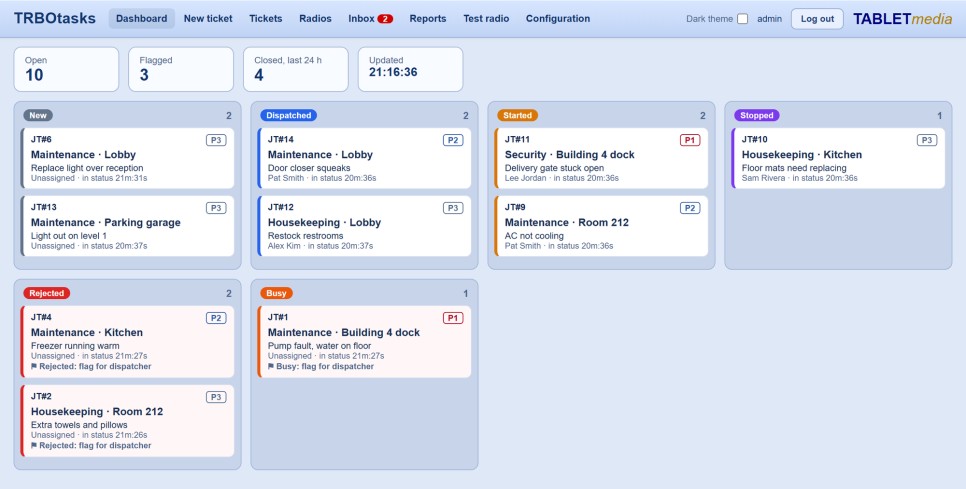
Who picked up the ticket? Is it done? Who closed it, and when? TRBOtasks answers all of it from one screen — tickets created and assigned in the browser, delivered to MOTOTRBO radio users, and tracked from acknowledgment through to completion, without a single voice call or paper list.
Hosted with TRBOserver on your own hardware, TRBOtasks runs as a Linux virtual machine on the same PC — one box, one place to look for the radios and the work they are doing.
Trusted since 2001 by 3,000+ organizations, including Fortune 10 corporations.
One workflow, dispatcher to field
Create, assign, monitor, reassign, escalate and close work from a single TRBOserver-connected interface.
Create & assign
Raise a ticket in the browser and send it to the right radio user or the next available resource.
Radio response
Acknowledgments, responses and status updates come straight back from MOTOTRBO users in the field.
Live status
See open, acknowledged, in-progress and completed work on one dashboard, as it happens.
Why TRBOtasks
One workflow end to end
Create, assign, monitor, reassign, escalate and close — all from one interface, with no second system to reconcile.
Role-based web access
Separate login types give dispatchers, supervisors and administrators the views and permissions that match their job.
Use the radios you already have
Structured work goes straight to MOTOTRBO radio users — no smartphones to buy, no app for staff to learn.
Escalation that holds
Escalation rules keep priority, overdue and unresolved tickets from quietly going nowhere.
100% on-premises
Runs as a Linux virtual machine on the same server as TRBOserver. Your ticket history never leaves your building.
A record that stands up
Every ticket carries a time-stamped history of who did what, and when it was closed.
What you can do with it
- Create tickets from a browser and assign them to the appropriate radio user or available resource.
- Watch acknowledgments, status, progress and completion update in real time.
- Move a ticket to another resource as priorities or staffing change.
- Escalate priority, overdue or unresolved work according to your operational workflow.
- Associate a worker with a shared radio through user sign-in, so accountability follows the person.
- Pull a time-stamped record of ticket activity, responses and completion.
Where it runs every day
Hospitality
Housekeeping, maintenance and guest-request jobs go straight to the radio a staff member is carrying — and completion is confirmed without a voice call.
Manufacturing
Maintenance, production and material-handling jobs reach radio users directly. Reassign as priorities change and keep supervisors informed.
Health care
Transport, facilities, environmental services and security tasks are assigned to available staff, with time-sensitive work escalated.
Utilities
Service tickets are dispatched to crews, redirected to available resources, and escalated when work is urgent or overdue.
One platform, one place to look
Because TRBOtasks runs on the same on-premise server as your MOTOTRBO system, there is one box, one login and one place to look for both the radios and the work in progress. Read more about how job ticketing fits alongside alarms, dispatch and tracking.